
Activation (CMS-SE-LXC)
When you first install and run CAYIN CMS Station, you will be in the trial mode, which allows the CMS server to manage only one SMP player. You still need to purchase and activate SMP licenses based on the number of SMP players you need to manage in your project.
Note |
|---|
The trial software allows you to test all functions, including those in CMS-PRO, but this CMS server can only manage ONE SMP player.
Please note that you can’t use CMS-PRO’s functions anymore if you only purchase SMP licenses without CMS-PRO. Once your SMP licenses are purchased and activated, CMS-PRO’s functions will be removed from CMS’ management interface. |
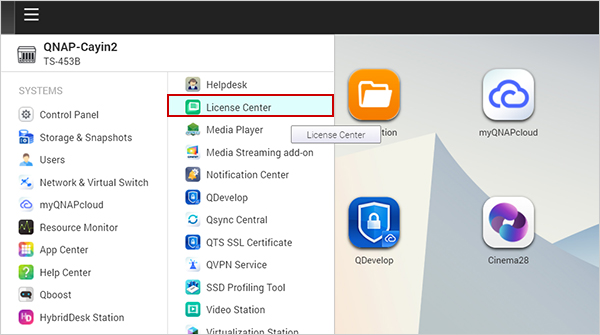
- Go to License Center on web administration page of QNAP NAS.
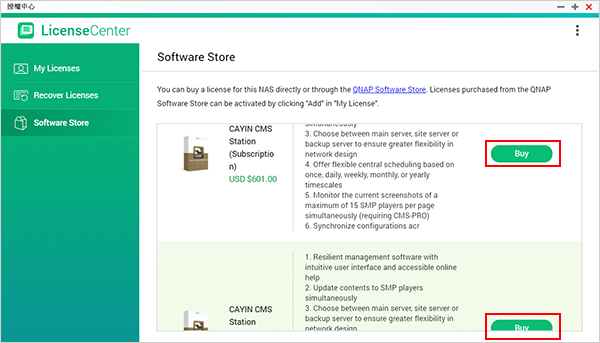
- Go to Software Store and locate CAYIN CMS Station in the drop-down menu. Click Buy and select a suitable license for you. You can make a one-time purchase or choose an annual license to pay a subscription fee every year. Then, click Next.
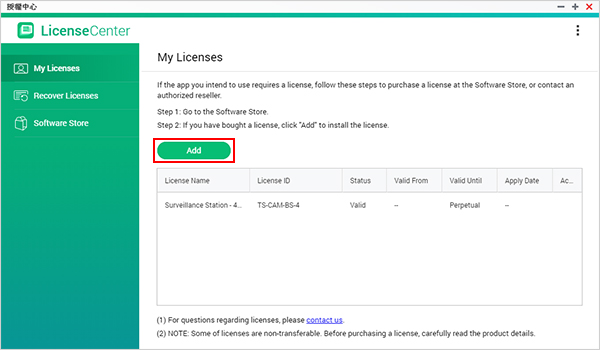
- Go to My Licenses and click the Add button. Select the license you just bought and click Add to activate the license. Then, you will see the activated license listing in the table on the My Licenses page.
 Note
NoteBefore activating CMS-PRO, you must activate an SMP connection license.
If the license options in the License Center cannot fit your needs, you can contact CAYIN directly to buy suitable licenses. In this case, you need to activate the software directly on CMS’ Web Manager. Please refer to the Activation page of CMS-SE for detailed instructions.
Back to Top